random walk through fields of musings

Sunday, March 21, 2010

implementing high-volume queues cheaply

Implementing write-heavy queues is hard to do in a technically "inexpensive" way -- RDBMS' are typically read-optimized and too heavy for the task of a simple queue, dedicated queuing packages require frameworks to run in etc., so the most simple queue that is "web-writable" I could come up with, which is chronologically ordered is to simply use the webserver logs as a queue. Serving static files, as simple as a text file that contains a simple string such as "ok" and named "ok.txt", is efficient in most webservers, and a small file is easily cached, so physical disk IO would be limited to writing the webserver access logs. To add items to the queue you can just use query parameters that will get recorded in the weblogs and then can be parsed out, ie.:

http://my_example_server.com/some_path/ok.txt?key=addme&value=withThisVal&whereAmI=London&why=toTrack

and the query params won't be "interpreted" by the static file, just show up in the weblogs as long as GET query params are set to be logged.


Most webservers allow writing the timestamp in a format that is easily machine readable (milliseconds since the epoch in UTC is probably a good choice). Using spread to write the logfile in realtime to the network would reduce the disk IO on the local webserver but a spread listener would have to write it somewhere, though the ability to add multiple listeners could spread the load.

Wednesday, March 10, 2010

album of my family (ala rattlesnake)

Courtesy of an IR camera, you can now "see" what some snakes can without such a camera.
IR 0126  IR 0202 Divya IR 0205 Jai IR 1462
kid hiding under a blanket:
IR 0220 Jai under a  blanket
a family pet in a few poses:
 IR 0127 IR 0193 bunny IR 1464 IR 1465
and the kids asleep:
IR 0835 Divya sleeping IR 0836 Jai sleeping


seeing things in a different light

Not being able to justify purchasing an IR ("Thermal imaging") camera and not finding one nearby for as good a price, I rented a FLIR b50 from flir.com for $425 per week ($25 sales tax plus I pay overnight shipping both ways) for the past week. The main purpose of the rental was to take followup pictures of our community's common house to see if the added insulation in the attic really made a difference but comparing the before and after IR pictures was complicated by the fact that the before pictures, taken by an "Energy Audit" firm, didn't have the temperature to color legend embedded.

In any case, I took pictures in my own unit, and the results mostly confirmed what I already knew.
  IR 0124 lens cap
don't take pictures with the lens cap on!

IR 0125 skylight
the skylight leaks heat like crazy -- 15 degree F difference between inside and skylight is more than the 10 degrees F a regular window typically has:

IR 0128 front door
blinds and most types of shades really do work well to keep the heat from leaking out windows -- here's the gap between shade and window and another one looking at an upstairs window which also has a thin curtain in front:
IR 0194 leakage around a honeycomb blind IR 0200 MBR upstairs window with shade
one of our upstairs windows was broken by a small rock a few years ago and replaced, however the replacement definitely isn't as well sealed as the original:
IR 0833 MBR S windows no drapes, right is Diamond glass replacement IR 0834 MBR S windows, right is Diamond glass replacement
(hint: replacement is on the right in both pictures -- I took two just to show that reflection works in all spectra) - that shoddy replacement is almost 10 degress F worse it seems...

Finally, our upstairs Master bedroom is always colder in winter than either the downstairs (where the thermostat is) or even the other bedrooms on the same floor. Originally we thought it was a lack of insulation in the attic above the master bedroom (which wouldn't account for it retaining heat well when heated by sunlight, but anything else seemed remote and unlikely), so we added insulation to the attic to no avail. An HVAC person confirmed that the room seemed pretty tight, but noted that the two ducts leading to that room were each less than half the size of the ducts to any other part of the house and so he posited that sufficient warm air, especially on the long run to that room, was just not making it to that room. To fix that, he'd have to replace the ducts which would have involved tearing open the walls etc., so might just be cheaper to put in booster vents in that room. With the IR camera I have proof that he was right:
 IR 0195 vent while furnace is on IR 0196 cold air return
that's a downstairs vent while the furnace is running -- around 114 degress F coming out (even if the numbers are uncalibrated, we hope that in relative terms they are pretty accurate) and a vent in the bathroom on the same floor, at an oblique angle and farther from the furnace. Next, we look upstairs:

IR 0201 guest room vent (compare with MBR vents)
in the guest room upstairs, it's about 104 degress, pretty good and that bedroom gets sufficiently warn by our experience. Now the kicker:

IR 0198 upstairs bedroom E vent (about 8 degress cooler than downstairs vent) IR 0199 upstairs MBR SE vent (12 degress cooler than downstairs vent)
Those are the two vents in the master bedroom, anywhere from 8 to 12 degrees cooler than the vent in the guest room. Clearly, not enough warm air is making it up into that room, and part of what does make it into that larger room probably escapes into the landing and up via the skylight due to a chimmney effect.

All these photos were taken at night to minimize sun glare/reflection effects.


Thursday, March 4, 2010

(mostly) machine readable event info

Being a geek means I cringe when easily parseable data isn't. The AADL is a fine public library and offers pretty cool online tools, but they only give us a RSS feed of checkouts with the due dates in the "summary" stanza. Although they send us an email reminder 2 days before the item is due, that doesn't fit into my iCal feed grokking calendar. There are a few other such RSS feeds that hide the event data within and being sure that I'm not the only one facing this problem I looked around for a generic solution and finally hit upon a few others using Yahoo Pipes!. It took far too long to get it just right (and even then timezone parsing is still off) but I made my first publically somewhat useful pipe, described as part of a thread on the AADL forums. If you want to see the source for the pipe or use it, read the forum post and then click on http://pipes.yahoo.com/rpaditya/aadlduedates.

Monday, April 27, 2009

monitoring core/vcpu usage on Sun CMT machines

Sun provides the /usr/local/bin/corestat CLI tool for their CMT (T1 and T2 Ultrasparc) machines which outputs in a loop with a line per core, however the output isn't suitable for long-term monitoring and trending.

Here's my approach to monitoring core (really vcpu or hardware thread) usage, divided into usr and sys. Add
exec vcpuidl /bin/sh /etc/snmp/conf/vcpuidl.sh to /etc/snmp/conf/snmpd.conf and the script /etc/snmp/conf/vcpuidl.sh is simply (mpstat is what corestat calls):


#!/bin/sh
/usr/bin/mpstat 1 2 | /usr/bin/awk 'BEGIN {RS="\n"; ORS="|"; } (NR>33) {print $13 "|" $14} END {print "\n"}'


which shows % usage per vcpu (or hardware thread) and it can be read via SNMP:


UCD-SNMP-MIB::extOutput.1 = STRING: usr|sys|0|0|0|0|0|0|0|0|0|0|0|0|0|0|0|0|0|1|0|0|0|0|0|0|0|0|0|0|0|0|0|1|0|0|0|0|0|0|1|1|1|0|0|0|0|5|0|0|0|0|0|0|0|0|0|0|0|0|0|0|0|0|0|0|


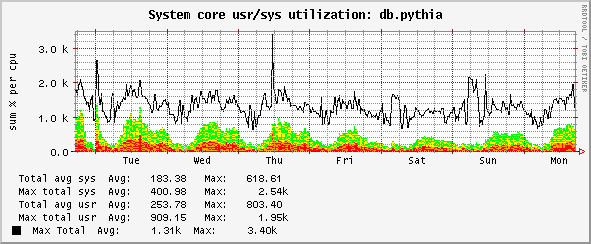
the above is from a Sun T2000 which has a Ultrasparc T1 with 8 cores and 4 hardware threads per core or 32 vcpus -- graphing then looks like this (alternate red and yellow bands for 32 x sys usage, green and yellow x 32 bands for usr usage):

cmt_core_utilization_week

note the peak over 3200 (8 cores x 4 threads per core x 100%) is due to the addition of max peaks of both usr and cpu (so a little misleading).


Tuesday, April 7, 2009

monitoring webapplication activity

Monitoring webapplications, gathering statistics and graphing them for trending visualization is a well-known and common practice. Gross bandwidth, disk space usage, possibly hits per second based on mod_status output in Apache, free heap, user sessions from a servlet engine (like Tomcat) are all frequent measures of activity. However to get more complete timeseries data for custom or not so commonly monitored variables that are in a webserver access log in near-realtime requires some extra effort.

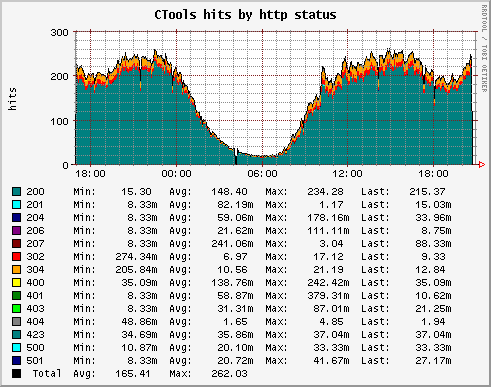
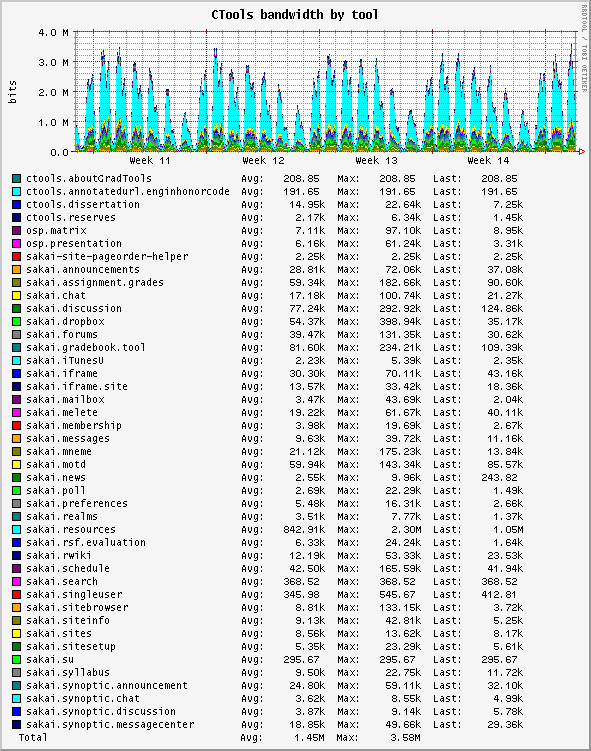
Timeseries graphing and data collection and consolidation is trivially done with a Round-robin Database, the most mature and useful, not to mention open-source of these is RRDTool. RRDTool consolidates the data over uniform time periods and so "bin-ing" the data is crucial. Out-of-the-box, webservers do not bin accesslogs, or at most at daily or hourly intervals. With cronolog on Apache, you can bin easily down to the minute (and perhaps even the second, though that is sort of silly in the cases I care about). With CTools, all the webserver traffic flows through a Netscaler load-balancer, which emits weblogs and rotates them up to once a minute. We use that to bin the data in 1 minute intervals and run a script out of cron (which doesn't have to parse timestamps making it much faster) to consolidate the data and slice and dice it into RRDs to produce graphs like these:

ctools_hits_by_http_status

showing hits by http status stacked -- glitches in the application show up very quickly in this

ctools_bandwidth_by_tool

the bandwidth by tool graph shows some custom processing done on each hit to determine which Sakai "tool" it was for and the size of the response, again, near-realtime.

There are a whole lot of uncommon stats for web applications that we can graph this way, and it is very useful for trending.

undelete resource (file) for Sakai (CTools)

CTools, the learning management system (LMS) for the University of Michigan is based on Sakai. Current versions of Sakai allow for uploads of resources -- binary blobs (files) that are managed internally, but in CTools case are stored on the filesystem. Sakai keeps a map of the original filename and the name as stored on disk (based on a GUID and hashed in a directory structure that looks like Year/DayOfYear/HourOfDay/fileGUID) in a SQL table called content_resource. Deletes of a resource remove the file on disk and the table row entirely. This means undeletes are not possible out-of-the-box. Based on the "event" table one could reconstruct which file was deleted and retrieve it from a filesystem snapshot manually and quite painfully (esp. when it was on AFS as that involved requesting the snapshot volume being mounted etc. which took time).

A couple of years ago, all the CTools resource storage was moved to a Netapp filer (snapmirrored to a standby at the secondary site every 10 minutes) and the files served over NFS to CTools/Sakai. The Netapp was managed by our group and we kept 10 days of snapshots online (readonly). This meant we could automate undeletes -- for now only CTools support staff can request them, but they do so through a web interface which drives a fully automated process not requiring sysadmin hands.

Here's how it works:
  • snapshots are made nightly, so a file has to exist when the snapshot is taken -- files created and deleted before a snapshot is made is not recoverable
  • the undelete has to be requested within 10 days of deletion
  • a ticket number has to be provided as that is used to name a directory in the support AFS space where the undeleted files are copied to from the snapshot
  • CTools uses Oracle, so a table was created:

    CREATE TABLE CONTENT_RESOURCE_DELETED
    ( RESOURCE_ID VARCHAR2(256 BYTE),
    XML CLOB,
    IN_COLLECTION VARCHAR2(256 BYTE),
    FILE_PATH VARCHAR2(128 BYTE),
    RESOURCE_UUID VARCHAR2(36 BYTE),
    DELETE_DATE DATE
    ) ;
    with an accompanying trigger:

    CREATE OR REPLACE TRIGGER TRG_CONTENT_RESOURCE_4_DELETED
    AFTER DELETE ON CONTENT_RESOURCE
    FOR EACH ROW
    BEGIN
    INSERT INTO CONTENT_RESOURCE_DELETED
    (RESOURCE_ID,XML,IN_COLLECTION,FILE_PATH,RESOURCE_UUID,DELETE_DATE)

    VALUES(:OLD.RESOURCE_ID,:OLD.XML,:OLD.IN_COLLECTION,:OLD.FILE_PATH,:OLD.RESOURCE_UUID,SYSDATE);
    END;
  • Each time a file is deleted, the row is copied to the content_resource_deleted table and preserved for 30 days (after which it is dropped).
  • The web-interface (a simple JSP that does a read-only lookup of the content_resource _deleted table based on a site_id) allows the support staff to pick the files to be undeleted (it only allows them to undelete files deleted before the last snapshot and deleted at most 11 days ago); picked files are saved to an undelete_queue table
    ---+---------------+---------------+------+---------+---------------+----+
    # | column | type | null | default | pk | fk |
    ---+---------------+---------------+------+---------+---------------+----+
    1 | FILE_PATH | VARCHAR2(128) | NO | [NULL] | SYS_C00121850 | |
    2 | RESOURCE_ID | VARCHAR2(256) | NO | [NULL] | | |
    3 | TICKET | VARCHAR2(64) | NO | [NULL] | | |
    4 | STATUS | VARCHAR2(12) | YES | [NULL] | | |
    5 | DELETE_DATE | DATE(7) | YES | [NULL] | | |
    6 | INSERTEDBY | VARCHAR2(16) | NO | [NULL] | | |
    7 | UPDATEDBY | VARCHAR2(16) | NO | [NULL] | | |
    8 | UNDELETE_DATE | DATE(7) | YES | [NULL] | | |
    ---+---------------+---------------+------+---------+---------------+----+
  • a script runs out of cron on a machine that has access to both AFS and the Netapp snapshots (currently one of our spare application servers) and polls the undelete_queue table for undelete requests
  • upon encountering an undelete request, the script searches for the file (knowing the deletion date and file-on-disk name it is a rather easy process to step through the snapshots from most recent to oldest so that the most recent copy is used) and copies it to the support AFS space into a directory named with the ticket number, naming the file with the original names (not GUID) that the user uploaded them with
  • the undelete_queue row status is updated appropriately depending on whether the file is successfully undeleted on not (ie., might not have existed when the snapshot was made) and an email is sent to the ticketing system with the result, alerting the support staff so that they can provide the file to the end-user
  • apart from some issues with the original file having a UTF-8 name (not all the toolchain is UTF-8 friendly) in which case it is copied preserving the GUID name, there have been remarkably few problems
  • stats so far are:
    dbmon@ctools.vip> select min(undelete_date) from UNDELETE_QUEUE ;
    ----------------------+
    MIN(UNDELETE_DATE)
    ----------------------+
    2009-01-26 10:23:25.0
    ----------------------+
    1 row in result (first row: 74 msec; total: 74 msec)
    dbmon@ctools.vip> select count(*), status from UNDELETE_QUEUE group by status;
    ---------+----------+
    COUNT(*) STATUS
    ---------+----------+
    258 UNDELETED
    8 NotFound
    8 Exists
    ---------+----------+
    3 rows in result (first row: 42 msec; total: 43 msec)
  • we probably could increase the number of snapshots (say every 3 hours) though given that only 8 were not found, that doesn't seem worth the extra storage required (though that might still be manageable)
    vol_ctfs2009_.snapshot
  • it would be ideal if Sakai provided user-managed soft-deletes and restores within the application (something promised for JCR backed resources in the future)
  • for now, this system has worked remarkably well and saved a lot of sysadmin time with minimal development (took about a week including debugging and testing)